
How to Check Supported CRM Integrations and Request New Integrations
Verify if your email marketing software or CRM is supported by GroupLeads, and learn how to request custom integrations for unlisted platforms.
Prerequisites
- An active GroupLeads account or trial.
- The name of your email marketing platform or CRM (e.g., GoHighLevel, ActiveCampaign, Klaviyo, HubSpot, ConvertKit, Mailchimp).
Step 1: Open the GroupLeads Integrations Page
Navigate to the official GroupLeads Integrations Directory to view the complete list of supported CRM integrations.
Step 2: Search for Your CRM or Email Marketing Platform
Use the search bar on the integrations directory page or browse alphabetically to verify if your platform is supported. GroupLeads currently integrates with over 70+ CRMs and email marketing tools.
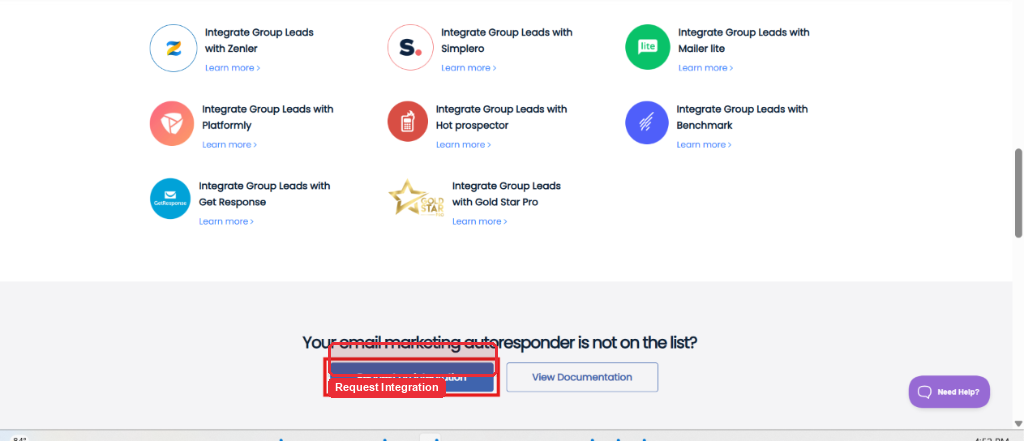
Step 3: Request a New CRM Integration (If Unlisted)
If your email marketing platform or CRM is not currently listed, you can request custom integration support:
- Email Request: Click Request an Integration on the integrations page to open an automated email inquiry to GroupLeads support (
[email protected]). - Live Chat: Click the Live Chat widget at the bottom right corner of the GroupLeads website to send your integration request directly to our technical team.
Tip: Feature integration requests are prioritized based on user demand. Mention your platform name and API requirements when submitting your request.
✅ You're all set — you can check supported platforms anytime or request custom integrations directly from our support team.