
How to Log In, Reset Your Password, and Access the GroupLeads Webapp
Logging in to the GroupLeads web app gives you access to your central dashboard, captured Facebook group leads, sales pipeline, webhooks, and account settings from any browser.
Follow the step-by-step guide below to sign in to your account, reset a forgotten password, or sign out safely.
Prerequisites
- An active GroupLeads account. (If you do not have one yet, click Registeron the login page to start a free trial.)
- Your registered email address and password.
Step 1: Sign In to Your Account
- Open your browser and go to the GroupLeads web app login page (
/login). - Enter your Email Address(1) (e.g.,
[email protected]). - Enter your Password(2) (minimum 6 characters).
- Click Sign In(3). (If you do not remember your password, click Forgot password? (4) to reset it.)

Once verified, you will be redirected straight to your GroupLeads Dashboard.
Step 2: Request a Password Reset Link (If You Forgot Your Password)
- On the login page, click Forgot password?above the Password field.
- On the Forgot Passwordpage, enter your registered Email Address(1).
- Click Send Reset Link(2).
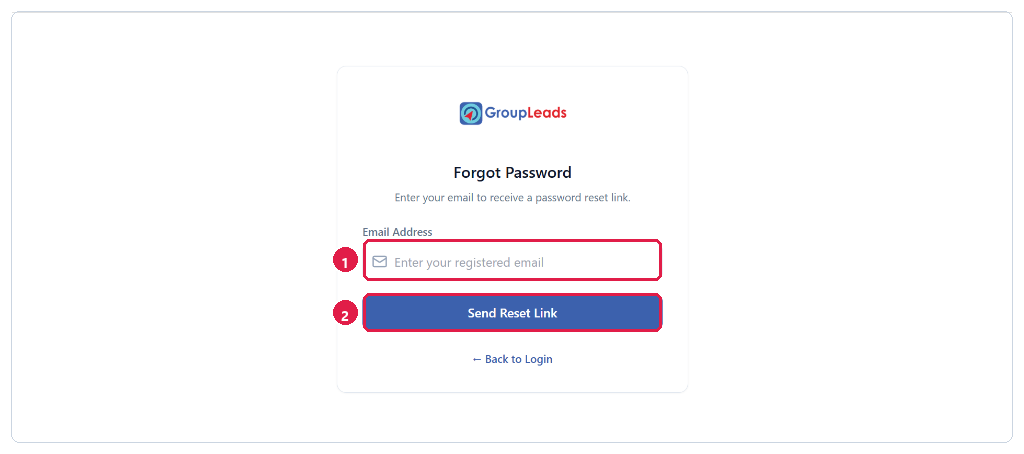
- A confirmation message will appear letting you know the reset link has been sent to your email, and you will be returned to the login page.
Step 3: Create a New Password
- Open the password reset email in your inbox and click the reset link.
- On the Reset Passwordpage, enter your New Password(1) (minimum 6 characters).
- Re-enter the same password in the Confirm Password(2) field. (You can click the eye icon inside either field to check what you typed.)
- Click Reset Password(3).

Your password will be updated and you will be redirected to the login page to sign in with your new credentials.
Step 4: Sign Out of Your Account
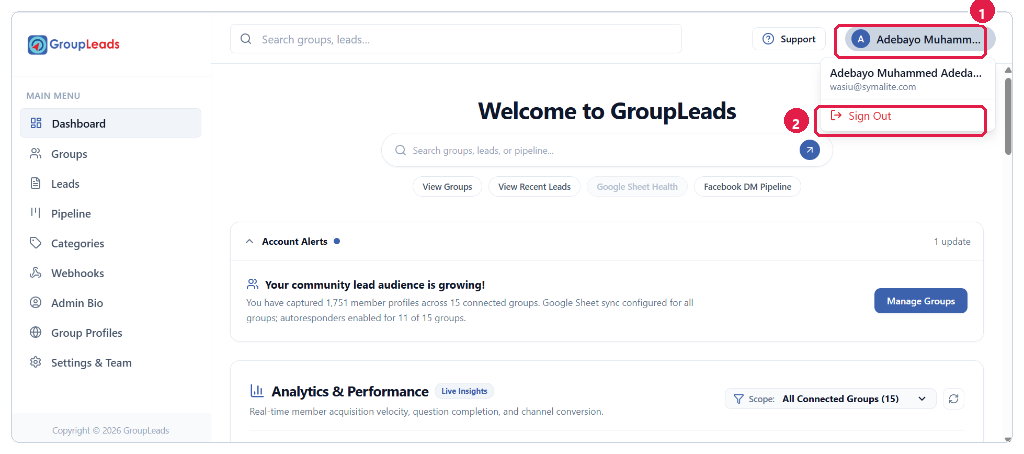
- From any page inside the web app, click your Account menu(1) (your name and avatar initial) in the top-right corner of the header.
- Click Sign Out(2) from the dropdown menu.
You're all set! You can now sign in, recover your password, and manage your GroupLeads web app session anytime.